A self-updating pkg for Apple Business Manager's built-in MDM: install the latest app version from Azure Blob in a postinstall
ABM's built-in device management pins every custom package to a SHA-256 hash and can't run scripts. A payload-free pkg whose postinstall pulls the current installer from Azure Blob gets you evergreen installs anyway.
I moved a small fleet onto Apple Business Manager’s built-in device management — the thing that used to be Apple Business Essentials before Apple folded it into ABM — and hit a wall the first time a vendor shipped an update. There is no “run a script” feature. And every custom package you add is registered with a SHA-256 hash: change one byte of the pkg and the hash no longer matches, so shipping a new app version means re-uploading the installer, re-hashing it, and editing the app entry in ABM. Every. Single. Release.
Coming from Jamf or Intune, where pushing a new version is a one-line change, that’s a real regression. Here’s the pattern I use to get the one-line workflow back.
How custom packages work in ABM’s built-in MDM
Three constraints shape everything:
- The pkg must be signed with a certificate the device trusts — in practice a Developer ID Installer certificate. Unsigned packages are rejected.
- You host the pkg yourself at a URL that starts downloading immediately when hit (no landing page, no redirect to another link), and you give ABM that URL plus the file’s SHA-256 hash. ABM verifies the hash before installing.
- There is no script deployment. Unlike Intune’s Shell scripts blade or Jamf policies, the built-in MDM installs packages and profiles — that’s it. If you need logic on the device, it has to live inside a package.
Constraint 3 is the opening: a pkg’s postinstall script runs as root at install time. Constraint 2 is why you want the pkg itself to never change.
The shape of the trick
I build one pkg that contains no application at all — just a postinstall script. When it runs on a Mac, the script reaches out to Azure Blob Storage, pulls down the current installer, and runs it. The bootstrap pkg registered in ABM never changes, so its SHA-256 never changes. To ship a new version of the app, I overwrite a single blob in the container. Every install after that gets the latest build, with no re-hashing and no touching ABM.
Two pieces:
- A payload-free, signed pkg — a package with zero files, whose only job is to run a script.
- A
postinstallscript that downloads the real installer from blob storage and installs it.
The “latest version” lives in the bucket, not in the package.
Building the payload-free pkg
Put the script in a scripts/ folder named exactly postinstall, make it executable, and hand the folder to pkgbuild with --nopayload:
mkdir -p scripts
# (write the postinstall below into scripts/postinstall first)
chmod +x scripts/postinstall

pkgbuild --nopayload \
  --scripts scripts \
  --identifier com.yourorg.acme-bootstrap \
  --version 1.0 \
  Acme-Bootstrap-component.pkg
--nopayload tells pkgbuild there are no files to lay down — the package exists only to run the scripts in scripts/. The postinstall runs as root at install time, which is exactly what you want for dropping an app into /Applications.
On Jamf you could stop here; signing is optional hygiene. In ABM’s built-in MDM it’s mandatory, and you want a distribution package, so wrap and sign in one step with productbuild:
productbuild --package Acme-Bootstrap-component.pkg \
  --sign "Developer ID Installer: Your Org (TEAMID)" \
  Acme-Bootstrap.pkg
Note the certificate type: Developer ID Installer, not Developer ID Application. If you sign with the wrong one, pkgutil --check-signature Acme-Bootstrap.pkg will still show a signature — but the install will fail on the device. Check that the output says Developer ID Installer before you upload anything.
The postinstall script
#!/bin/bash
# postinstall — download the current installer from Azure Blob and install it.
# Ships inside a payload-free "bootstrap" pkg.
# Replace the blob in Azure = ship a new version. This pkg never changes.

set -euo pipefail

# --- config -----------------------------------------------------------------
# Read-only, container-scoped, expiring SAS. It only grants pulling an
# installer we'd hand out anyway — low sensitivity, but keep it read-only.
BLOB_URL="https://YOURACCOUNT.blob.core.windows.net/installers/Acme-latest.pkg"
SAS="?sv=2024-11-04&ss=b&srt=o&sp=r&se=2027-01-01T00:00:00Z&sig=REDACTED"
# ----------------------------------------------------------------------------

workdir="$(mktemp -d)"
trap 'rm -rf "$workdir"' EXIT
pkg="$workdir/installer.pkg"

echo "Downloading the current installer…"
if ! curl -fsSL "${BLOB_URL}${SAS}" -o "$pkg"; then
  echo "ERROR: download failed" >&2
  exit 1
fi

# A failed/expired SAS returns an XML error page, not a pkg. Catch that before
# handing garbage to installer.
if ! file "$pkg" | grep -qi 'xar archive'; then
  echo "ERROR: downloaded file is not a valid pkg (check the SAS/URL)" >&2
  exit 1
fi

echo "Installing…"
installer -pkg "$pkg" -target /

exit 0
A few deliberate choices in there:
mktemp -d+ atrapso the download lands in a unique temp dir and gets cleaned up no matter how the script exits.curl -fsSL—-ffails the command on an HTTP error instead of happily saving the error body; quote the whole URL because the SAS string is full of&and=.- The
file … xar archivecheck. This is the one that saves you a support ticket: when a SAS expires or the URL is wrong, Azure hands back an XML error document. Without the check you’d pass that toinstallerand get a confusing failure. The check turns it into a clear log line.
Hosting both pkgs in Azure Blob
Azure Blob ends up holding two things, with very different lifecycles:
Acme-Bootstrap.pkg— the signed bootstrap. Uploaded once, then frozen. This is the URL you give ABM.Acme-latest.pkg— the real installer. Overwritten on every release. Only the postinstall ever touches it.
Create a private container, then overwrite the one moving blob on every release:
az storage blob upload \
  --account-name YOURACCOUNT \
  --container-name installers \
  --name Acme-latest.pkg \
  --file ./Acme-3.4.1.pkg \
  --overwrite
Prefer clicking? Azure Storage Explorer does the same job — on the container’s toolbar, Upload > Upload Files…:
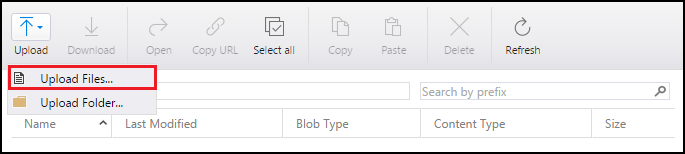
Pick the pkg, leave the blob type on Block Blob, and upload. (If the dialog offers a Target Access Tier, Cool is the cheapest and plenty for an installer that gets read a few times a week.)
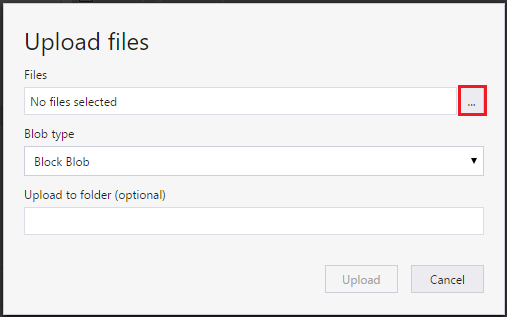
The Macs always pull Acme-latest.pkg; you decide what that name points at. Shipping 3.4.2 next month is one upload --overwrite away — and because the bootstrap pkg didn’t change, the SHA-256 registered in ABM is still valid.
The SAS token
Generate a read-only, container-scoped SAS with an expiry — never an account key:
az storage container generate-sas \
  --account-name YOURACCOUNT \
  --name installers \
  --permissions r \
  --expiry 2027-01-01 \
  --auth-mode login --as-user \
  --output tsv
In Storage Explorer it’s a right-click on the container > Get Shared Access Signature… — set the expiry and tick Read only (untick List and everything else; the script fetches one known blob by name):
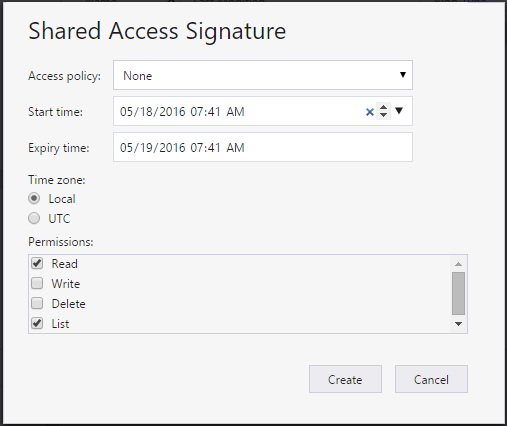
Then copy the query string from the next screen — that’s the SAS= value the postinstall needs (treat it like a credential; anyone with the full URL can pull the file):
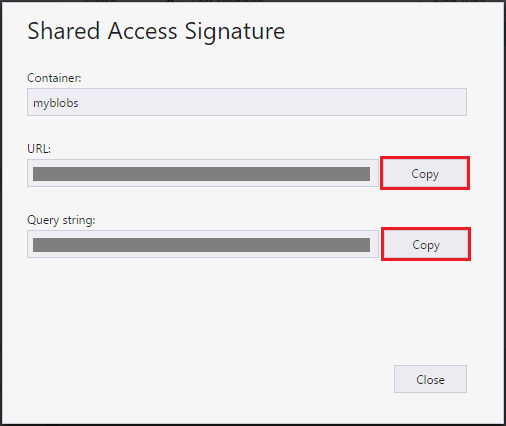
Yes, that token ships inside the pkg. I’m comfortable with that because it grants exactly one thing — reading an installer I’d otherwise hand to anyone on the fleet — and nothing else: no write, no listing the account, no other container. To rotate it without rebuilding the pkg, back the SAS with a stored access policy and revoke the policy server-side. Otherwise, rotating means issuing a new SAS, rebuilding the bootstrap once, and updating the hash in ABM once.
One wrinkle specific to ABM: the bootstrap’s own download URL needs a SAS too (or a public blob, if you’re fine with that), and ABM fetches that URL directly — so if the bootstrap’s SAS expires, new installs fail even though nothing on your side “changed”. Give the bootstrap’s SAS a long expiry and put the date in your calendar.
Registering it in ABM
Take the hash of the signed bootstrap — the exact file you uploaded:
shasum -a 256 Acme-Bootstrap.pkgThen in Apple Business Manager, add it as a custom package under Devices > Built-in Management > macOS Packages > Add New Package: name, the blob URL (with its SAS query string), and that SHA-256. Assign it to your device group and you’re done.
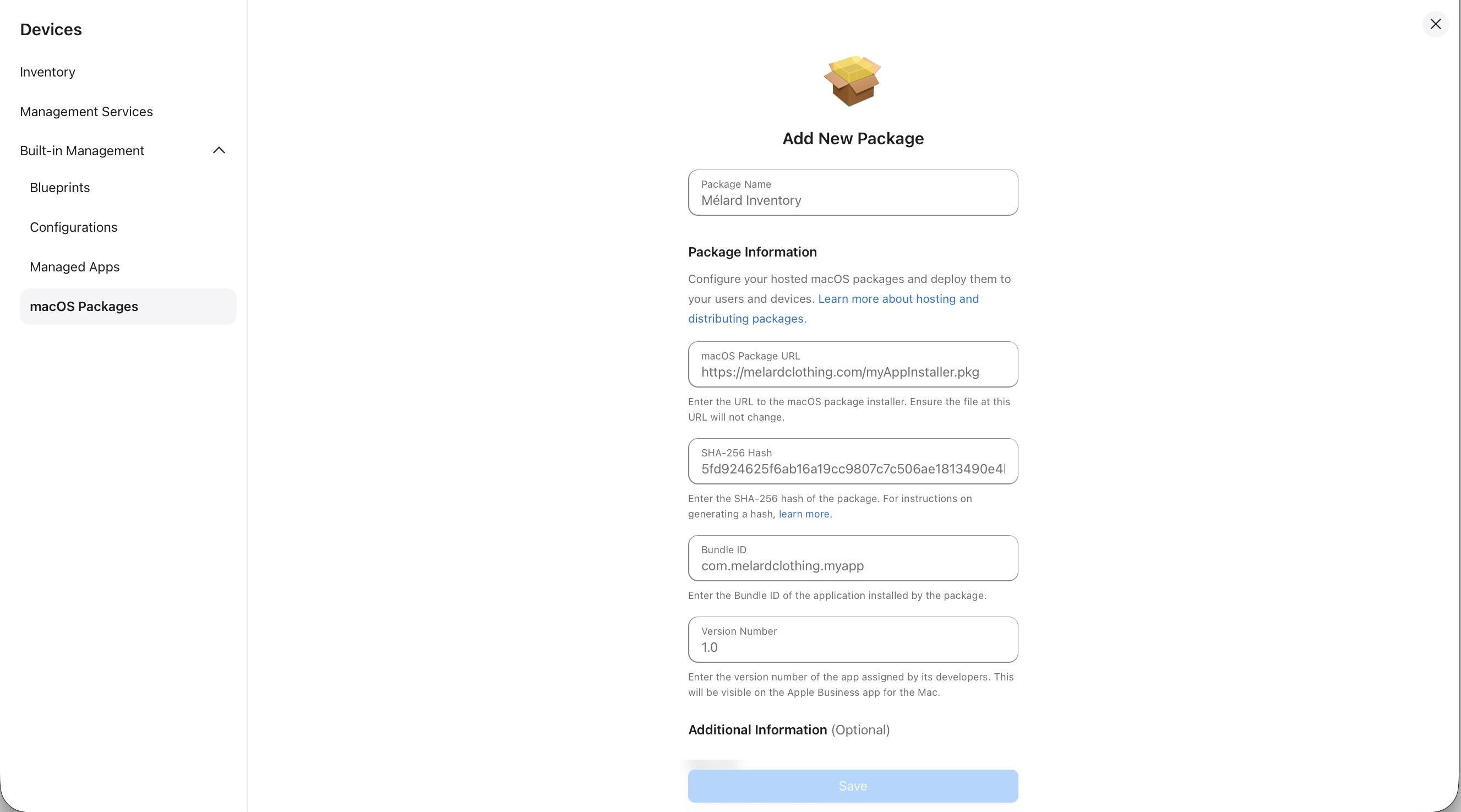
From then on the entry is frozen — here’s the bootstrap once registered, with the blob URL and hash locked in. The only thing that ever changes is the Acme-latest.pkg blob.
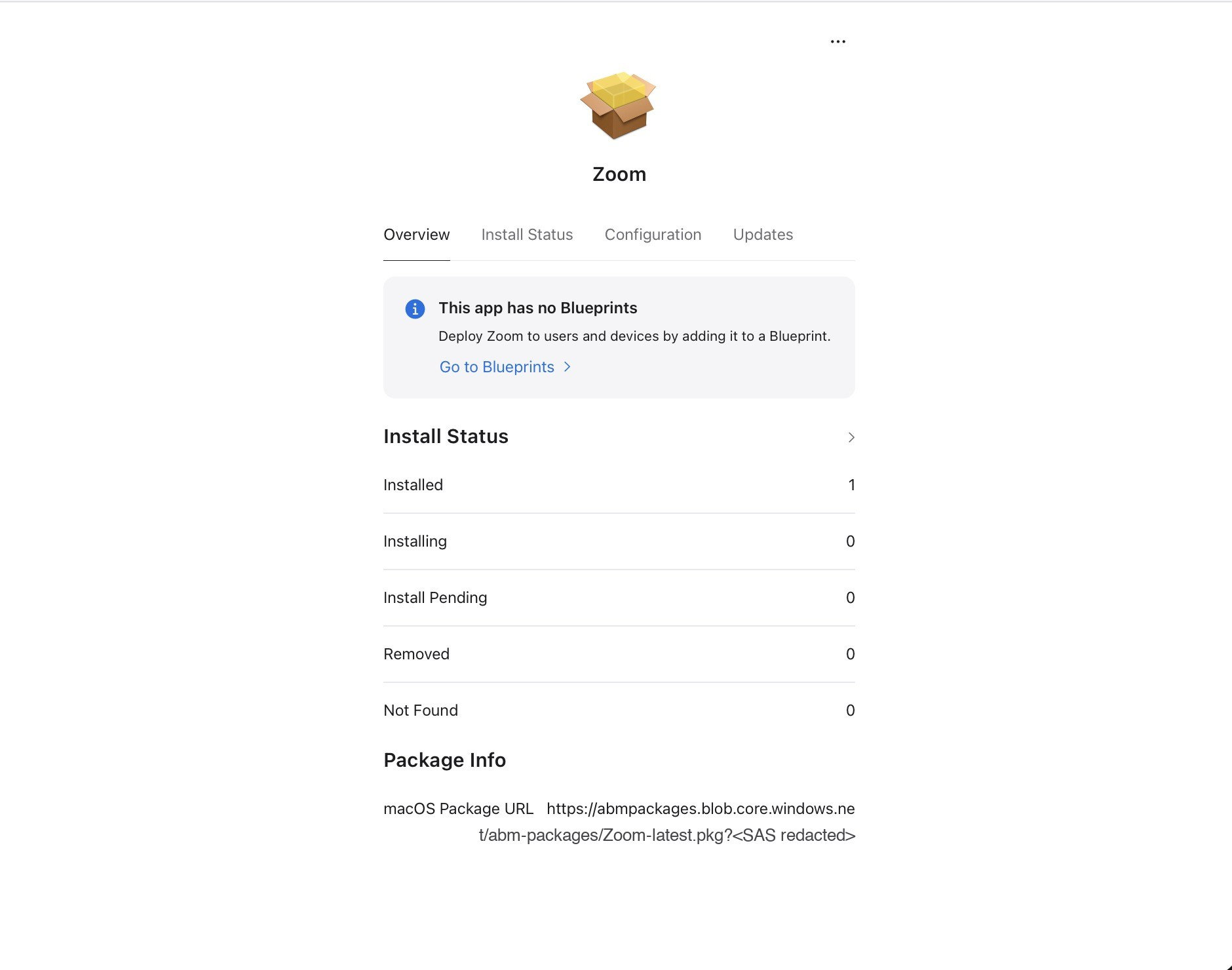
If ABM rejects the package or the install silently never lands, check the two usual suspects in order: the URL doesn’t start a download directly when pasted into a browser (redirects and HTML pages are rejected), or the hash was taken of a different file than the one at the URL — easy to do if you re-sign and forget to re-upload.
On Jamf or Intune instead?
The same bootstrap pkg works anywhere that can install a package — upload it to Jamf once and scope a policy to it; the blob workflow is identical. On Intune you can skip the pkg entirely: it has a native Shell scripts feature (Devices > macOS > Shell scripts), so you deploy the postinstall’s logic as a script and let Intune handle execution and retries. The pkg wrapper is the workaround for MDMs that can’t run scripts — which is exactly what makes it the right shape for ABM’s built-in MDM.
And the pattern is storage-agnostic — only the URL and the auth differ. AWS S3 with a presigned URL, Backblaze B2, Cloudflare R2, a plain web server: if curl can reach it, the script doesn’t care. If you outgrow a single fixed name — say you want version history and rollback — upload versioned files (Acme-3.4.1.pkg) plus a tiny Acme.json manifest that names the current one. The script reads the manifest first, then downloads what it points to.
Takeaway
ABM’s built-in MDM pins packages by hash and gives you no scripts — which sounds like it forces re-packaging on every release. It doesn’t: make the thing ABM pins a pointer, not a payload. A payload-free signed pkg with a postinstall that pulls from blob storage never changes, so its hash never changes, and “update the app” shrinks to a single az storage blob upload --overwrite. The less your MDM can do on-device, the more valuable a frozen bootstrap becomes.
Storage Explorer screenshots from Manage Azure Blob Storage resources with Storage Explorer (Microsoft Learn), CC BY 4.0.
Subscribe to gen/os
New write-ups on Apple device management — real problems and the fixes that hold up. Straight to your inbox, no spam, unsubscribe anytime.
Comments
No comments yet. Start the conversation.